Follow/Up Charts in the program are dynamically created with predefined templates.
There is 1 template for the Follow/Up Charts (see H&P types)
This template is combined with the disease-template (e.g. Heart Failure). eH&P™ uses
two different templates for each disease or problem. The first disease-template is used for the H&Ps,
and the second for the Follow/Up Chart.
When the Create button is clicked on, the program selects, combines, structures and orders the data in
the respective templates. Then it displays the H&P or F/U Chart in a new window.
See the Template for the Follow/Up Chart
Follow/Up Chart CREATION
The only format available for the F/U Charts is: Print, english, no-audio.
When the Follow/Up Chart Type option is selected, the program ignores any other selection in the format,
language and audio fields.
To Create the Follow/Up Chart:
Select the Follow/Up Chart CHOICE (in the master page), then select the number of extra
rows for the table (0, 5, 10, 15), write your name (optional). Click the 'Create eH&P button',
the new window appears with your choice. That's it. See

























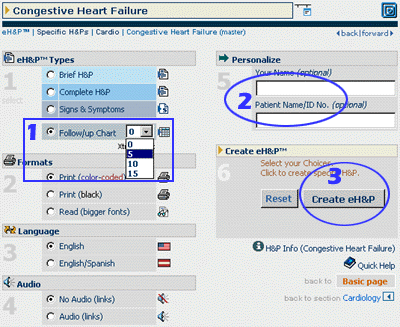
 Exhibit 13. eH&P™ Follow/Up Chart Creation.
 back
back

