All H&Ps in the program are dynamically created with predefined templates.
There are 3 generic templates for the three different Types of H&Ps
(Brief, Complete, Signs & Symptoms) and one template for the Follow/Up Charts. These templates are combined with the specific templates (e.g. Heart Failure). eH&P™ uses
two different specific templates for each disease or problem, these templates are not customizable in this version (they will be customizable in the future online version).
The first specific-template is used for the H&Ps, and the second for
the Follow/Up Chart. Notice that all data elements in the generic Templates are eH&P™
generic elements (appear in black).
Data Elements in the disease-specific templates are eH&P™
specific elements (appear in red). Generic Templates can be seen in the eH&P™ program Templates section.
In the Sex & Age section look for the H&P Template and click on it. Alternatively, click on the Demos below.
When the Create button is clicked on, the eH&P™ program selects, combines, structures
and orders the data in the respective templates. Then it displays the H&P or F/U Chart
in a new window.
Specific H&P CREATION
Although it takes 6 choices to create an H&P in this program, usually it only takes one (click), two or 3 steps.
See H&P Versions.
To create and customize an H&P in 3 steps:
In the master page select Brief or Complete Type, then choose Print/Read Format,
Click the 'Create eH&P button', the new window appears with your choice. That's it.
To create and customize an H&P in One-click™:
In the master page Click the 'Create eH&P button', the new window appears with
the Specific H&P (Brief, print color-coded, english format). That's it.
See
Exhibit 12. eH&P™ Specific-H&P Creation.
The rest of the options (language, sound) can be selected 'ad lib' depending on the User's preferences and clinical context.
The H&Ps and F/U Charts may be personalized with your name and the patient's name/data (optional).
You can then Print your choice.

























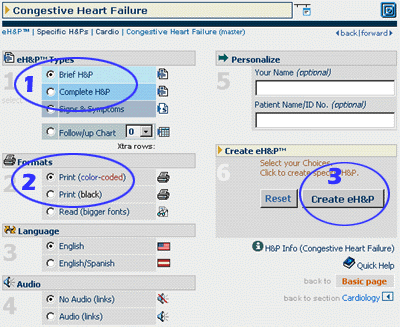
 Exhibit 12. eH&P™ Specific-H&P Creation.
 back
back

