 |

The Cholesterol Management Tool Input page (entry-page) contains 22 fields.
Most Fields default to a negative answer. Make sure to go over all Fields
and select the appropriate choices for the particular Patient. An "NA" result on the output
page means that some information is missing. This can be important or not depending on the
particular case.
Assessments
1) To generate the most comprehensive assessment, complete all fields.
2) To obtain a complete assessment (Major Risk Factors, Framingham Scores, Metabolic Sx
and Therapeutic Recs), the following fields must be completed:
AGE, GENDER, SYSTOLIC BP, WAIST CIRC, FH of CHD, CHD, DM, HTN, On HTN MEDS,
ATHEROSCLEROTIC DISEASE, SMOKING, CHOLESTEROL, HDL, TG, LDL, GLUCOSE
(in other words, all inputs but Numbers 4, 5, 15, 16, 22)
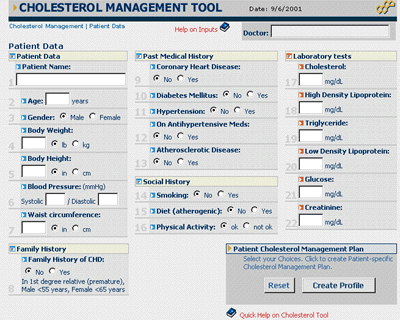
 Exhibit 5. Cholesterol 2.0™ Input Page (Cholesterol Tool).
Notice that the program is designed to evaluate the information available, allowing users to
enter data in a few fields (not all). For example, if the Patient is a Diabetic and input No. 10
is "Yes", there is no need for Risk Assessment or Framingham scoring, the patient has
a CHD-Risk equivalent, fields for risk assessment could be left blank. However, fields necessary
for Metabolic Sx assessment and Therapeutic Recs must be filled out for a complete plan (if
applicable).
|
Cholesterol Tool INPUTS
|
| |
The table below summarizes information about the 22 inputs in the Patient
Data Entry Page.
Technical and Clinical information (like NCEP-ATP-III
specifications and definitions) is included.
|
|
|
|
|
 |
All the inputs under the same visual field.
|
|



















 back
back