 |

Navigation through Cholesterol 2.0™ is based on hyperlinks.
They are used intelligently allowing quick and efficient access to specific information.
Most hyperlinks change in color when the pointer of the mouse is placed over (hover).
To return to previous pages, you can always use the back button of your browser.

|
Location/Links LINE
|
| |
The Location/Links Line is found in all pages throughout the application.
It is always located underneath the main Title.
The example below shows that you are in the Medical Calculators section,
and the LDL Page.
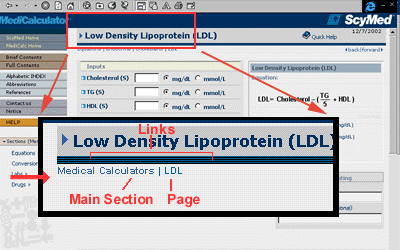
 Exhibit 2. Cholesterol 2.0™ Location/Links Line.
|
|
 |
Click on the
back BUTTON of your browser to return to previous pages.
|
|


















 back
back